

Vendor Portal Development: Replace Email-Based Vendor Coordination
Vendor coordination often becomes messy long before a business realizes it has a systems problem.
A vendor emails a document.
Someone downloads it.
Another employee saves it to a shared folder.
A spreadsheet tracks whether the document is approved.
Someone notices that a certificate is expiring.
Another email is sent.
A vendor asks whether the document was received.
Someone checks the inbox.
Another team needs the same information.
The process works.
Until it doesn’t.
As the number of vendors, documents, locations, projects, or compliance requirements grows, email and spreadsheets become increasingly difficult to manage.
A vendor portal can create one structured place for vendors and internal teams to manage:
- Onboarding
- Documents
- Requests
- Approvals
- Compliance
- Status
- Communication
- Account information
The goal is not simply to give vendors a login.
The goal is to replace fragmented coordination with a workflow both sides can understand.
What Is a Vendor Portal?
A vendor portal is a secure web-based application that allows suppliers, contractors, service providers, or other vendors to interact with a business through structured workflows.
Depending on the organization, vendors may use the portal to:
- Complete onboarding
- Update company information
- Upload documents
- Submit certificates
- Respond to requests
- View missing requirements
- Track approval status
- Review purchase information
- Submit invoices
- Access project documents
- View payment status
- Manage users
- Respond to compliance requests
Internally, employees may use the portal to:
- Review vendor applications
- Manage onboarding
- Approve documents
- Track missing information
- Assign vendor status
- Monitor expiration dates
- Request updates
- See compliance readiness
- Run reports
- Manage vendor access
A strong vendor portal creates a shared workflow instead of maintaining two disconnected versions of the process.
The Real Problem: Vendor Information Is Scattered
Many businesses do not have one vendor-management process.
They have several overlapping tools.
Information may exist in:
- Spreadsheets
- ERP
- Accounting software
- Shared drives
- Procurement systems
- Project management tools
- Individual employee folders
This creates simple but important questions that become difficult to answer.
For example:
- Has this vendor completed onboarding?
- Which documents are missing?
- Is their insurance certificate current?
- Who reviewed this document?
- Has the vendor been approved?
- Which vendors need follow-up?
- When does this document expire?
- Which location does this vendor serve?
- Was this information already requested?
- What is blocking activation?
If employees need to search several places to answer these questions, the business does not have strong vendor visibility.
It has pieces of a process.
Signs Your Business May Need a Vendor Portal
A custom vendor portal becomes worth considering when several of these problems happen repeatedly.
Vendors Regularly Email Documents
This is one of the clearest signals.
Documents may include:
- Insurance certificates
- W-9 forms
- Licenses
- Contracts
- Safety documentation
- Certifications
- Compliance forms
- Product documents
- Invoices
When these arrive through email, someone must decide:
- Where to save them
- Who reviews them
- Whether they are complete
- Whether they are current
- What happens next
A portal can move that workflow into a structured system.
Employees Maintain Vendor Status in Spreadsheets
Spreadsheets often become the operational layer for tracking:
- Onboarding
- Approval
- Missing documents
- Expiration dates
- Vendor category
- Contact information
This can work with a small vendor base.
It becomes increasingly fragile as more people edit the data or the workflow gains complexity.
Vendors Keep Asking for Status
Common questions may include:
- Did you receive our documents?
- Are we approved?
- What are we missing?
- Has the invoice been processed?
- When can we begin work?
- Do we need to update anything?
These questions indicate a visibility gap.
A portal can allow vendors to see the status themselves.
Compliance Requires Ongoing Follow-Up
Some vendor relationships require continuing compliance rather than a one-time onboarding.
For example:
- Insurance expiration
- License expiration
- Safety certificates
- Training
- Background checks
- Contract renewals
Email reminders and spreadsheets may become difficult to manage reliably.
A portal can track expiration dates and outstanding requirements more systematically.
Multiple Internal Teams Work With the Same Vendors
A vendor may interact with:
- Procurement
- Operations
- Accounting
- Compliance
- Project teams
- Management
Without a shared workflow, different departments may request the same information or maintain conflicting records.
A vendor portal can provide one operational view while preserving role-based permissions.
Vendor Portal vs. Vendor Management Software
These terms overlap but are not identical.
Vendor management software may focus primarily on internal vendor records, performance, procurement, or compliance.
A vendor portal focuses more directly on the interaction between the business and the vendor.
The portal may become the vendor-facing component of a broader vendor-management process.
For example:
Vendor portal
- Vendor submits information
- Vendor uploads insurance
- Vendor sees missing requirements
Internal vendor management
- Employee reviews documents
- Compliance approves vendor
- Management reports on readiness
The two should ideally support the same workflow.
What Should a Vendor Portal Include?
The correct feature set depends on the business.
But several capabilities are common.
Secure Vendor Login
Each vendor should have secure access to information relevant to their organization.
The system may support:
- User invitations
- Password reset
- Multi-user vendor accounts
- Account administrators
- Multi-factor authentication where appropriate
Vendor users should not be able to see other vendors’ information.
That account isolation is foundational.
Vendor Profile
The portal may allow vendors to manage information such as:
- Company name
- Contacts
- Addresses
- Tax information
- Service categories
- Regions
- Certifications
- Payment details
- Business identifiers
Some data may be editable by the vendor.
Other fields may remain controlled internally.
That distinction should be defined during planning.
Vendor Onboarding Workflow
Instead of coordinating onboarding through a checklist in someone’s inbox, the portal can guide vendors through required steps.
For example:
- Create account
- Enter company information
- Upload W-9
- Upload insurance
- Complete compliance questionnaire
- Accept agreement
- Submit for review
- Receive approval
The system can show what is:
- Complete
- Missing
- Under review
- Rejected
- Approved
This immediately improves visibility.
Document Management
For many vendor portals, this is one of the most important areas.
Vendors may need to upload:
- Contracts
- Certificates
- Tax forms
- Licenses
- Compliance documents
- Safety records
Internal employees may need to:
- Review
- Approve
- Reject
- Request replacement
- Add comments
- Track expiration
The workflow around the file is usually more important than the file itself.
Expiration Tracking
Certain vendor documents have limited validity.
The portal may track:
- Expiration date
- Current status
- Required replacement
- Notification schedule
For example:
An insurance certificate expires in 30 days.
↓
Vendor receives reminder.
↓
Vendor uploads replacement.
↓
Internal reviewer approves it.
↓
Compliance status updates.
This replaces repeated manual follow-up.
Missing Requirement Visibility
One of the most useful portal features is simply showing the vendor:
What is still required?
For example:
- W-9: Complete
- Contract: Complete
- Insurance: Expired
- Safety certification: Missing
This can eliminate significant back-and-forth communication.
Internal Review and Approval
The internal team needs structured tools to process submissions.
Version one may allow employees to:
- Open vendor
- Review submitted information
- Approve documents
- Reject documents
- Request changes
- Add internal comments
- Update vendor status
The system should make ownership clear.
If a document is pending, someone should know who is responsible for reviewing it.
Status Tracking
Possible vendor statuses might include:
- Draft
- Submitted
- Under Review
- Missing Information
- Approved
- Conditionally Approved
- Suspended
- Inactive
Do not create more states than the workflow actually needs.
Notifications and Reminders
Notifications can support:
- Missing documents
- Rejected submissions
- Upcoming expiration
- Approval
- Renewal
- Action required
Internal users may receive alerts when:
- Vendor submits onboarding
- Document needs review
- Compliance issue occurs
- Requirement becomes overdue
Automation should eliminate useful follow-up, not generate unnecessary email.
Search and Filtering
Internal teams may need to filter vendors by:
- Status
- Category
- Region
- Location
- Compliance
- Missing requirement
- Expiration date
This becomes increasingly valuable as the vendor base grows.
Reporting
Useful reports may include:
- Vendors pending approval
- Missing documents
- Expired documents
- Upcoming expirations
- Vendor count by status
- Vendor count by category
- Compliance readiness
- Average onboarding time
Reporting turns individual vendor activity into operational visibility.
The Biggest Mistake: Digitizing a Bad Vendor Process
A vendor portal will not fix a poorly defined vendor process automatically.
Before building, ask:
- What makes a vendor approved?
- What information is actually required?
- Who reviews each requirement?
- Are different requirements needed by vendor type?
- What happens when something expires?
- Who can override requirements?
- When should a vendor become inactive?
If nobody can answer these questions consistently, the workflow needs clarification before development.
Otherwise the portal will simply digitize confusion.
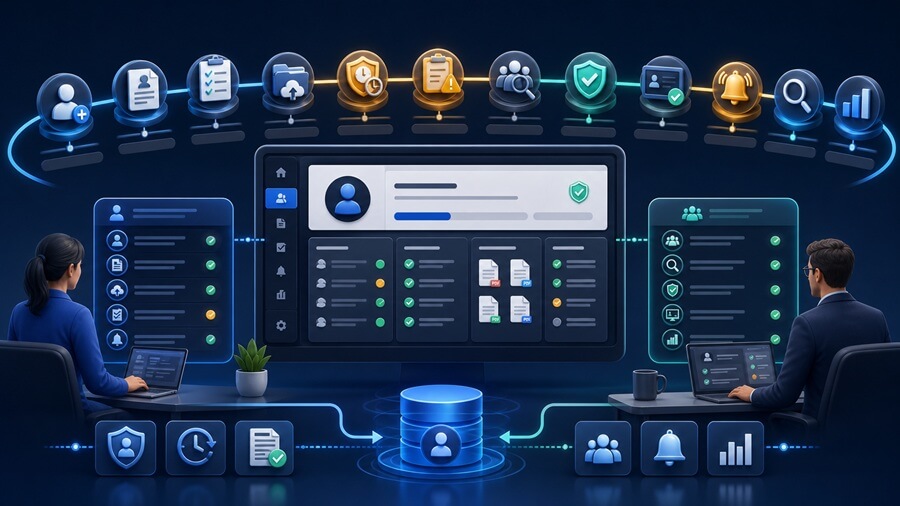
Map the Vendor Lifecycle First
A useful approach is to map the entire vendor lifecycle.
For example:
Potential Vendor
↓
Invited
↓
Onboarding Started
↓
Documents Submitted
↓
Internal Review
↓
Approved
↓
Active Vendor
↓
Compliance Monitoring
↓
Renewal
↓
Inactive
Each stage may have different:
- Requirements
- Actions
- Permissions
- Notifications
This lifecycle should drive the portal design.
Not Every Vendor Needs the Same Workflow
This is where custom portal development can become particularly useful.
Different vendor categories may have different requirements.
For example:
A contractor may require:
- Insurance
- Safety certification
- License
A product supplier may require:
- W-9
- Banking information
- Product certification
A professional-services vendor may require:
- Agreement
- W-9
- Insurance
The portal can apply requirements based on:
- Vendor type
- Location
- Service category
- Risk level
But this should be kept as simple as possible in version one.
What Should Be in Version One?
A focused first release might include:
Vendor Side
- Secure login
- Vendor profile
- Onboarding checklist
- Document upload
- Status visibility
- Missing requirements
- Notifications
Internal Side
- Vendor list
- Onboarding review
- Document approval
- Vendor status
- Basic compliance tracking
- User administration
What Can Often Wait?
Later phases may include:
- Vendor performance scorecards
- Advanced procurement
- Complex contract management
- Electronic bidding
- Advanced invoice processing
- Deep ERP integration
- Vendor self-service reporting
- Mobile app
- AI assistant
- Complex multi-tier vendor structures
- Advanced analytics
The first release should solve the coordination problem before trying to become a complete procurement platform.
Integrations Can Make the Portal Much More Valuable
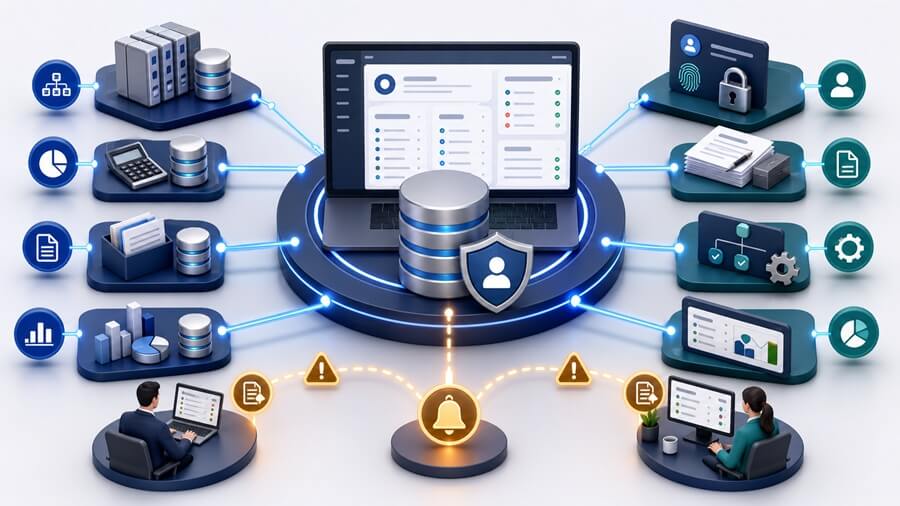
A vendor portal may need to connect with:
- ERP
- Accounting
- Procurement system
- CRM
- Document management
- Payment platform
- Project management
- Identity system
For example:
Vendor becomes approved in portal.
↓
Approved vendor record syncs into ERP.
This can eliminate manual data entry.
Or:
Accounting system shows invoice payment status.
↓
Vendor sees status in portal.
This can reduce repetitive payment inquiries.
Integrations should be selected based on operational value.
Avoid Creating Another Data Silo
A vendor portal becomes counterproductive if employees must:
- Review vendor information in portal
- Copy the same data into ERP
- Update compliance spreadsheet
- Save documents somewhere else
That simply adds another system.
The portal should reduce handoffs.
Not create more of them.
Which System Should Own Vendor Data?
This should be defined early.
For example:
| Information | Source of Truth |
|---|---|
| Vendor master record | ERP |
| Onboarding documents | Vendor portal |
| Payment status | Accounting |
| Compliance status | Vendor portal |
| Project assignments | Project system |
The portal does not need to own every piece of information.
It needs to present and manage the information required for the workflow.
Vendor Portal vs. Shared Drive
A shared drive solves file storage.
It does not solve:
- Workflow
- Status
- Ownership
- Approvals
- Expiration
- Notifications
- Reporting
If the problem is simply:
“Where do we store documents?”
a shared drive may be enough.
If the problem is:
“How do we manage the process around those documents?”
a portal becomes more relevant.
Vendor Portal vs. Email
Email remains useful for communication.
But it should not be responsible for maintaining workflow state.
Email does not reliably answer:
- What is complete?
- What is missing?
- Who owns review?
- What has expired?
- What is approved?
A portal can maintain that structured state while email remains a notification channel.
How to Measure Vendor Portal ROI
Potential measures include:
- Vendor onboarding time
- Employee follow-up hours
- Percentage of vendors fully compliant
- Missing-document rate
- Expired-document rate
- Time to approve vendors
- Vendor status inquiries
- Duplicate data entry
- Manual reporting effort
- Compliance issues
Before development, identify which outcomes matter most.
Then measure them after launch.
Example: Vendor Compliance Portal
Consider a company working with hundreds of contractors.
Each contractor must maintain:
- Insurance
- License
- Safety certification
Current process:
Documents arrive through email.
↓
Employee saves files.
↓
Spreadsheet tracks expiration.
↓
Employee sends reminders.
↓
Manager asks for compliance report.
A portal could change the workflow:
Vendor uploads required documents.
↓
System tracks expiration.
↓
Reviewer approves or rejects.
↓
Vendor sees compliance status.
↓
Automated reminders request renewals.
↓
Management sees compliance dashboard.
This is a measurable operational improvement.
Example: Supplier Onboarding Portal
A manufacturer may onboard new suppliers through:
- W-9 attachments
- Vendor forms
- Contracts
- ERP entry
A portal could create:
Supplier invitation.
↓
Structured profile.
↓
Required documents.
↓
Internal approval.
↓
ERP synchronization.
↓
Supplier activated.
The main value is not the portal interface.
It is the elimination of disconnected onboarding steps.
Example: Project Vendor Portal
A construction, service, or project-based business may work with vendors assigned to specific projects.
The portal may support:
- Project assignments
- Required project documents
- Task status
- Compliance
- Deliverables
- Communication
The portal becomes a shared operational workspace around the vendor relationship.
Where AI Can Fit in a Vendor Portal
AI should not drive the portal strategy.
But it may improve specific workflows.
Potential uses include:
- Extracting expiration dates from certificates
- Extracting vendor information from W-9s
- Classifying documents
- Detecting missing information
- Summarizing vendor history
- Flagging unusual or incomplete submissions
For example:
Vendor uploads insurance certificate.
↓
AI extracts:
- Provider
- Policy number
- Expiration date
↓
Employee reviews extracted information.
This may reduce manual data entry.
That is a practical use case.
A generic vendor chatbot may not be.
Vendor Portal Security
Vendor portals may contain sensitive information such as:
- Tax forms
- Contracts
- Banking-related information
- Insurance documents
- Business data
Security requirements may include:
- Authentication
- Role-based access
- Encryption
- Secure document storage
- Audit logging
- Account-level isolation
- API security
- Backup
- Monitoring
If particularly sensitive financial information is involved, the architecture should be planned accordingly.
Do Not Collect More Data Than You Need
Portal projects often create a temptation to request every possible vendor field.
That increases:
- Onboarding friction
- Data maintenance
- Security responsibility
Ask:
Why do we need this information?
If the business has no operational reason to collect it, leave it out.
A simpler onboarding experience generally improves completion rates.
Frequently Asked Questions
What is a vendor portal?
A vendor portal is a secure online application that allows suppliers, contractors, and service providers to complete onboarding, submit information, upload documents, track requirements, and interact with a business through structured workflows.
What features should a vendor portal include?
Common features include secure login, vendor profiles, onboarding checklists, document uploads, compliance tracking, expiration management, approvals, notifications, status visibility, reporting, and internal administration.
When does a business need a vendor portal?
A vendor portal may be useful when vendor onboarding, compliance documents, approvals, and status tracking are being managed through email, spreadsheets, shared folders, and repeated manual follow-up.
Can a vendor portal track expiring documents?
Yes. A portal can track expiration dates for documents such as insurance certificates or licenses and send reminders when replacements are required.
Should a vendor portal integrate with ERP or accounting software?
In many cases, yes. Integrations can reduce duplicate data entry and allow approved vendor records, payment status, or other information to move between systems.