
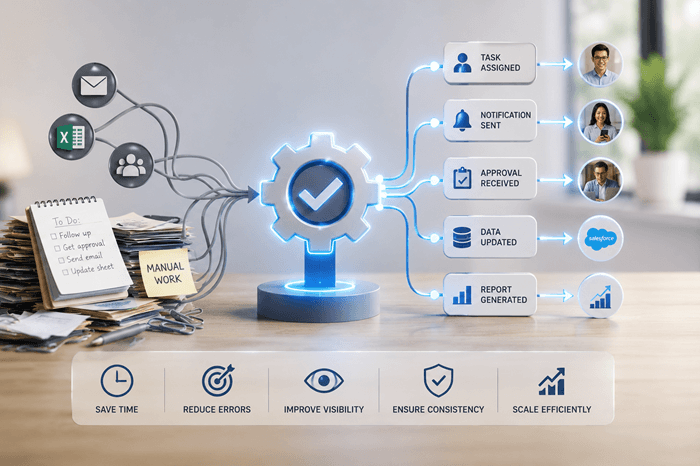
Workflow Automation: How Growing Businesses Reduce Manual Work and Operational Drag
Most growing businesses do not have a people problem.
They have a workflow problem.
Employees spend too much time chasing updates, copying data between systems, sending reminder emails, preparing reports, checking spreadsheets, following up on approvals, and manually coordinating work that should move through a system.
At first, this feels normal.
A spreadsheet here.
An email thread there.
A shared folder.
A status meeting.
A few manual reminders.
But as the business grows, these workarounds become operational drag.
Workflow automation helps businesses reduce that drag by moving repeatable processes through clear steps, rules, notifications, approvals, integrations, and reporting.
The goal is not to automate everything.
The goal is to automate the parts of the business where manual coordination is slowing people down.
What Is Workflow Automation?
Workflow automation is the use of software to move tasks, information, approvals, notifications, and data through a business process with less manual effort. A workflow may involve:
- A customer request
- An internal approval
- A vendor submission
- A document review
- A quote
- An order
- A support ticket
- A project task
- A compliance step
- A payment milestone
- A fulfillment process
- A reporting update
Automation helps define what happens, who is responsible, what information is needed, what rules apply, and what happens next. Good workflow automation does not just make a task faster.
It makes the process more reliable, visible, and scalable.
The Real Problem: Manual Coordination Does Not Scale
Manual coordination works when a company is small.
A few people can remember what needs to happen. They can ask each other for updates. They can track exceptions in their heads. They can get by with spreadsheets and email.
That breaks down as volume increases. The warning signs usually look like this:
- People need to ask for status updates constantly.
- Tasks get delayed because someone missed a handoff.
- Approvals are buried in email.
- Data is entered more than once.
- Reports require manual cleanup.
- Customers or vendors ask for updates the team should already know.
- Managers depend on meetings instead of dashboards.
- Exceptions are handled differently by different people.
- Important work lives in someone’s inbox.
- No one has a reliable view of what is pending, delayed, approved, rejected, or completed.
This is not just inefficient.
It creates risk.
When workflows depend on memory, inboxes, spreadsheets, and informal follow-up, the business becomes harder to manage as it grows.
Workflow Automation Is Not Just Task Automation
A common mistake is thinking workflow automation means automating small individual tasks.
That is only part of it.
The bigger opportunity is automating the movement of work across people, departments, systems, and decisions.
For example, a business may not just need to automate one email reminder.
It may need to automate the full flow:
- Request submitted
- Information validated
- Task assigned
- Manager notified
- Approval requested
- Documents attached
- Status updated
- Customer notified
- Internal team alerted
- Report updated
- Exceptions escalated
- Final record saved
That is where real operational leverage appears.
The business does not just save a few minutes.
It creates a repeatable process that is easier to manage, measure, and improve.
Common Business Workflows That Can Be Automated
Workflow automation can apply across many areas of a business.
Common examples include:
- Customer onboarding
- Vendor onboarding
- Quote and estimate approval
- Order processing
- Job or project tracking
- Internal task assignment
- Document collection
- Contract review
- Purchase approvals
- Inventory requests
- Field service updates
- Scheduling workflows
- Compliance tracking
- Employee onboarding
- Support ticket routing
- Reporting and dashboard updates
- Invoice review
- Change request management
- Customer or vendor portal workflows
The best candidates are not always the most complicated workflows.
They are usually the most repeated ones.
A simple process repeated hundreds of times can create more waste than a complex process that happens occasionally.
When Workflow Automation Makes Sense
Workflow automation becomes worth considering when the same manual process happens repeatedly and creates measurable friction.
Strong candidates usually have at least one of these characteristics:
- Multiple people are involved.
- Multiple systems are involved.
- The process has approvals or handoffs.
- Work is delayed when someone forgets to follow up.
- Status visibility is poor.
- Data is copied between tools.
- Exceptions are common.
- Customers, vendors, or employees need updates.
- Reporting is manual.
- The process affects revenue, delivery, compliance, or customer experience.
A business does not need automation because a workflow is annoying.
It needs automation when the workflow is repeated, important, and costly to manage manually.
When Not to Automate Yet
Not every process should be automated.
Automation is a bad idea when the process is unclear, unstable, or poorly understood.
You probably should not automate yet if:
- No one can clearly explain the current process.
- Every team member handles the workflow differently.
- The business rules change constantly.
- Leadership has not defined the desired outcome.
- The process happens rarely.
- The pain is minor.
- The company is trying to automate around bad habits.
- The workflow should be simplified before it is digitized.
This is where many businesses waste money.
They automate a messy process and end up with a faster mess.
Before automation, the workflow should be mapped, simplified, and validated.
The best automation projects start by removing unnecessary steps, not just digitizing them.
The Difference Between Automation and Custom Workflow Software
Some workflow automation can be handled with existing tools.
For example, a business may use platforms like CRM systems, project management tools, form builders, helpdesk software, accounting platforms, or automation tools to handle basic workflows.
That is often the right starting point.
Custom workflow software becomes more relevant when the business process is specific, cross-functional, or difficult to manage inside standard tools.
A custom workflow system may be needed when:
- Different users need different portals or permissions.
- Existing tools do not match the business process.
- The workflow connects customers, vendors, internal teams, and managers.
- The process depends on custom rules.
- The business needs role-based dashboards.
- Data must move between several systems.
- Standard tools create too many workarounds.
- Reporting needs are specific.
- The workflow is central to how the business operates
The right answer may also be hybrid.
A company may keep its CRM, accounting software, ecommerce system, or project management tool, while building a custom workflow layer that connects the gaps.
Workflow Automation Examples
Example 1: Quote Approval Workflow
A business receives quote requests from customers.
The old process may involve email, spreadsheets, manager review, pricing rules, vendor checks, and manual follow-up.
An automated workflow could:
- Capture the request in a structured form
- Route it to the right team
- Apply basic validation rules
- Notify the manager for approval
- Track status
- Store documents
- Send customer updates
- Create reporting on pending, approved, and rejected quotes
This reduces confusion and gives leadership visibility into quote activity.
Example 2: Customer Onboarding
A customer onboarding process may involve sales, operations, finance, support, and account management.
Without automation, each team may rely on emails, meetings, and manual checklists.
An automated workflow could:
- Create onboarding tasks after a deal closes
- Assign responsibilities by role
- Collect required documents
- Trigger internal notifications
- Track completion
- Escalate delays
- Update the customer portal
- Show managers what is pending
The result is a more consistent customer experience.
Example 3: Document Review and Approval
Many businesses still manage document review through email attachments and version confusion.
An automated workflow could:
- Upload documents into a central system
- Assign reviewers
- Track comments
- Manage approval status
- Store revision history
- Notify the next person in the process
- Create an audit trail
This is especially useful when documentation affects compliance, billing, customer approvals, or vendor coordination.
Example 4: Operational Reporting
A business may spend hours each week preparing reports from spreadsheets, CRM exports, accounting tools, or internal systems.
Automation can reduce that effort by:
- Pulling data from multiple sources
- Cleaning or structuring information
- Updating dashboards
- Sending scheduled reports
- Highlighting exceptions
- Showing trends and bottlenecks
Reporting automation is often one of the most practical starting points because it gives leadership better visibility without changing every workflow at once.
Where AI Fits in Workflow Automation
AI should not be treated as the entire automation strategy.
That is usually shallow thinking.
AI is most valuable when it supports a defined workflow.
Practical AI use cases may include:
- Extracting information from PDFs, forms, or emails
- Summarizing customer requests
- Classifying support tickets
- Suggesting next steps
- Searching internal knowledge
- Drafting responses for human review
- Identifying exceptions
- Flagging incomplete information
- Creating summaries from operational data
- Helping managers review trends or bottlenecks
But AI should not replace process design.
A vague workflow with AI added on top is still a vague workflow.
The business needs clear steps, rules, roles, data, and escalation paths. AI can then become a useful layer inside that process.
Workflow Automation and Integrations
Workflow automation often depends on integration.
A process may start in one system and finish in another.
For example:
- A form submission may create a CRM record.
- A CRM status change may trigger an onboarding task.
- An ecommerce order may update inventory.
- A customer portal action may notify an internal team.
- A support ticket may create a project task.
- A completed task may update a dashboard.
- An approved invoice may trigger an accounting workflow.
Without integration, teams often become the connection between systems.
That means people manually move data from one tool to another.
That is not scalable.
When systems are connected properly, the workflow becomes smoother, faster, and easier to measure
The Role of Dashboards in Workflow Automation
Automation should create visibility, not just movement.
A workflow system should help leaders answer:
- What is pending?
- What is delayed?
- Who owns the next step?
- Which requests are stuck?
- Where are bottlenecks happening?
- What volume is coming in?
- How long does each stage take?
- Which customers, vendors, or teams need attention?
- What exceptions need escalation?
This is where many automation efforts fail.
They move work through a process but do not give management enough visibility.
A strong workflow automation system should include dashboards, status views, alerts, and reporting from the beginning.
Start With the Workflow, Not the Software
Businesses often start with the wrong question: “Which automation tool should we use?”
The better first question is: “What workflow are we trying to improve?”
Before selecting tools or building software, the business should define:
- The starting trigger
- The users involved
- The required information
- The decision points
- The business rules
- The approval steps
- The exceptions
- The systems involved
- The reporting needs
- The desired outcome
Without this clarity, the company may buy another tool and create another disconnected process.
Software should support the workflow.
It should not become another place where work gets stuck.
A Prototype-First Approach to Workflow Automation
A prototype-first approach reduces the risk of building the wrong automation.
Instead of jumping directly into development, the business first maps and validates the workflow.
This may include:
- Identifying the process to automate
- Mapping current steps and handoffs
- Removing unnecessary steps
- Defining user roles
- Clarifying business rules
- Designing the ideal workflow
- Creating prototype screens
- Reviewing dashboards and status views
- Identifying integrations
- Validating the workflow with real users
This makes the automation more practical.
It also exposes weak assumptions early.
For example, leadership may think a process has five steps, while employees actually manage fifteen exceptions manually.
A prototype makes those gaps visible before the business invests in full development.
Questions to Ask Before Automating a Workflow
Before starting a workflow automation project, ask:
- What process are we trying to improve?
- How often does this workflow happen?
- Who is involved?
- Where does the process start?
- Where does it end?
- What information is required?
- What decisions or approvals are needed?
- What exceptions happen regularly?
- Which systems are involved?
- Where does duplicate data entry happen?
- Where do delays occur?
- What visibility does management need?
- What should customers, vendors, or employees be able to see?
- What reports should be generated?
- Can an existing tool solve this, or do we need a custom workflow layer?
These questions help determine whether the business needs configuration, integration, automation tooling, or custom software.
How Argos Helps with Workflow Automation
Argos Infotech helps growing businesses design and build workflow automation systems around how their operations actually work.
We help companies move beyond spreadsheets, inboxes, disconnected tools, and manual coordination by creating practical systems that improve
visibility, reduce repetitive work, and support growth.
Our work may include:
- Workflow mapping
- Prototype-first system design
- Internal portals
- Customer portals
- Vendor portals
- Approval workflows
- Task and status tracking
- Dashboard and reporting systems
- API-based integrations
- Legacy system modernization
- AI-enabled workflow support where appropriate
We do not start by assuming everything should be custom-built.
We start by understanding the workflow, identifying the operational bottlenecks, and deciding whether the right solution is configuration, integration, automation, custom software, or a hybrid approach.
The goal is simple:
Build the system around the business process, not the other way around.
Final Takeaway
Workflow automation is not about replacing people with software.
It is about removing the repetitive coordination work that slows people down.
A growing business should consider workflow automation when manual handoffs, duplicate entry, unclear status, approval delays, disconnected systems, or poor reporting start limiting operational performance.
The smartest automation projects begin with workflow clarity.
Map the process. Remove unnecessary steps. Define the rules. Prototype the system. Then automate what creates real leverage.
IS till Managing Critical Workflows Through Email and Spreadsheets?
Argos can help you map your process, identify automation opportunities, and design a prototype-first workflow system before you commit to full development.
Frequently Asked Questions
What is workflow automation?
Workflow automation is the use of software to move tasks, information, approvals, notifications, and data through a defined business process with less manual effort.
When should a business automate a workflow?
A business should consider workflow automation when a repeated process involves manual handoffs, duplicate data entry, approval delays, poor visibility, disconnected systems, or reporting that takes too much time to prepare.
Is workflow automation the same as custom software?
No. Some workflow automation can be handled with existing tools. Custom software becomes more relevant when the workflow is specific to the business, involves multiple user roles, connects several systems, or requires custom rules and reporting.
What business processes can be automated?
Common examples include customer onboarding, vendor onboarding, quote approvals, order processing, document review, task assignment, support routing, reporting, scheduling, compliance tracking, and project workflows.
Should a business automate a messy process?
Not immediately. A messy process should be clarified and simplified before automation. Otherwise, the business may create a faster version of the same operational problem.
How can AI support workflow automation?
AI can support workflow automation by extracting data, summarizing requests, classifying tickets, searching internal knowledge, drafting responses, identifying exceptions, and assisting with reporting. AI works best when it is connected to a clear workflow.